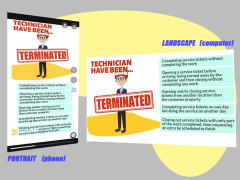
 An animation created for one purpose might become a useful piece of a completely different learning experience. That makes the original production investment much more useful.
So, now, after two weeks, you finally have a good idea of what you want in an animation.
You know how you want it to look. You know what you want it to say. You're ready to tell the animator what you want.
Except... you're not really sure what format your animation should be in.
Do you want a film, a videotape, or a DVD?
Probably not. This is the twenty-first century.
You want digital media. But what does that mean?
You may have heard of things like MP4 video files or animated GIFs. The type of deliverable you need depends heavily on how you intend to use your animation.
Where Will It Be Used?
 An explainer animation created for training might simply be an MP4 video that you upload to a platform like YouTube or Vimeo.
The same animation could also be placed inside a training course built with Lectora, Articulate Storyline, Rise, or Adobe Captivate.
A logo animation might be designed to repeat continuously, making it useful on a website or as part of a presentation.
The animation hasn't necessarily changed.
The way you're using it has.
And that can change what you need from the final deliverable.
Think About the Audience
Before deciding on a deliverable, consider the environment where people will encounter it.
- Where will they see it?
- What device will they use?
- Will they be watching, interacting, practicing, or referencing?
- Do you need to track their activity?
- Does the content need captions or other accessibility features?
- Does it need to work inside an LMS?
These questions can affect everything from the file you create to the way the animation is designed.
Size Matters

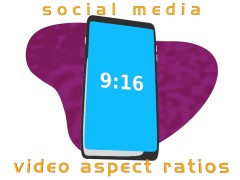 The intended destination can also affect the aspect ratio of your animation.
A 1:1 square format can work well for square social-media posts and other spaces designed around a square image or video.
A 4:5 vertical format is commonly used for portrait-oriented social content and gives you more vertical space on a phone screen.
You may also hear about 2:3 as a story format. It was once commonly used for vertical content, but platforms moved away from it years ago in favor of 4:5 and other mobile-friendly ratios.
For full-screen phone content, 9:16 vertical is the familiar format used for platforms such as Instagram Reels, Instagram Stories, and TikTok.
And then there's 16:9, the traditional widescreen format used for television, computer displays, YouTube, presentations, and other landscape video.
Why does this matter?
Because creating an animation in the wrong aspect ratio can leave you with awkward cropping, empty space, or a video that simply doesn't fit the environment where you want to use it.
The destination can affect the design before the first frame is ever animated.
How Long Should It Be?
Length is another deliverable decision.
A long-form training animation might work for a specific presentation or feature-length learning experience.
But training often benefits from shorter, modular pieces.
Instead of creating one 30-minute animation, you might create several shorter animations that can be used individually or combined into a larger training experience.
That makes the content easier to update, easier to reuse, and potentially easier for the learner to consume.
Sometimes the best deliverable isn't one long animation.
It's a collection of smaller ones.
One Animation, Multiple Uses
A well-designed animation doesn't necessarily have to be used only once.
A core animation could become part of an eLearning course.
The same media could support a VILT presentation.
Shorter sections could be reused for communications or reinforcement.
An animation created for one purpose might become a useful piece of a completely different learning experience.
That makes the original production investment much more useful.
Don't Forget Accessibility
The final deliverable also needs to work for the people who will actually use it.
That may mean including:
- Captions or subtitles
- Transcripts
- Audio descriptions when appropriate
- Accessible interactions
- Appropriate visual and audio design
The goal isn't simply to create something that looks good.
The deliverable needs to be usable by the intended audience.
Choose the Deliverable Before You Animate
The deliverable can also influence how much interaction belongs in the finished product.
A standalone instructional video may need little or no interaction.
An eLearning course may need questions, scenarios, decisions, demonstrations, or practice.
The point isn't to add interaction because you can.
The finished product should match what the learner needs to do.
That's why it's worth thinking about the deliverable before the animator starts animating.
You know how you want it to look.
You know what you want it to say.
Now you need to know where it's going and how people will experience it.
That's the Deliverable.

 More animation doesn't necessarily mean more engagement.
 The important distinction is that style describes what your audience sees—not necessarily how the animation was created.